INCIDENT COMMAND & ENROUTE RESPONSE PLATFORM
Tactical Command, Simplified.
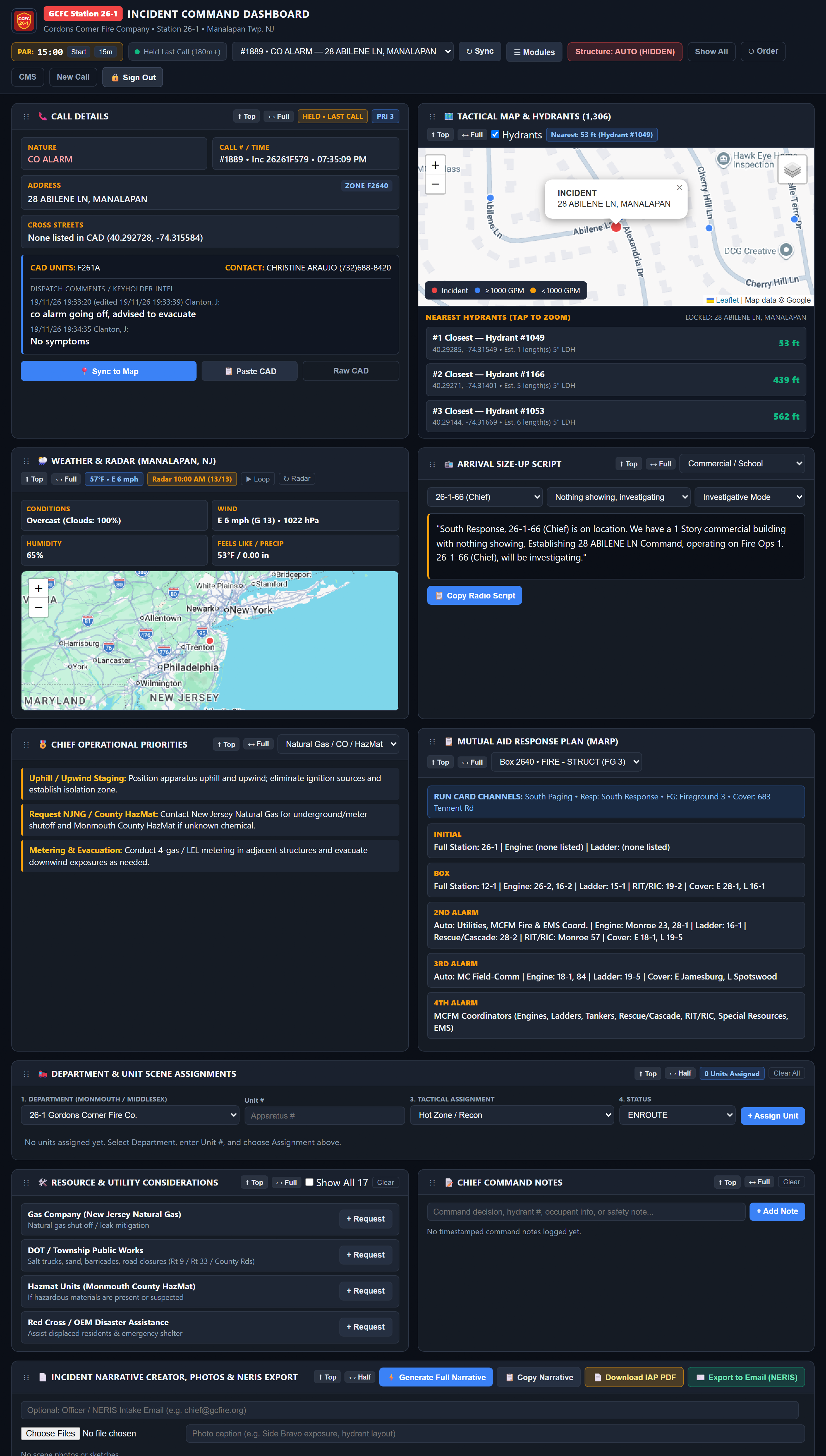
BeaconCommand parses live CAD dispatches into automated arrival size-ups, GIS hydrant mapping, crew accountability, and NERIS-ready command logs -built for Fire Chiefs, Officers, and Incident Commanders.
HOW IT WORKS
From CAD Tone to Command Post in Seconds
Tactical Unit & Sector Assignments:
Assign apparatus to Attack, Search, RIC, or Divisions with live on-scene status tracking.
Timestamped Command Logs:
Dedicated LUNAR Mayday logging and Chief Command notes record every critical action in real time.
15-Minute PAR & Accountability Timers:
Built-in PAR countdown timers and structure-fire checklists keep operational benchmarks front and center.
One-Click IAP & NERIS Export:
Generates formatted PDF Incident Action Plans and NERIS-ready incident records without double data entry.
Live CAD & Dispatch Parsing:
Automatically ingests CAD and IamResponding alerts to display incident type, cross-streets, and real-time dispatch notes.
GIS Hydrant & Water Supply Mapping:
Plots nearest hydrants, main sizes, and distances before first-due arrival.
Automated Arrival Size-Up Scripts:
Surfaces structured initial size-up prompts matched to call type and occupancy for crisp first-due radio reports.
SOG Guidance:
Automatically pulls matching Mutual Aid Response Plans (MARP), box run cards, and department SOG considerations.
DEPLOYMENT & ADMINISTRATION
Built to Fit Your Department
Zero-Hardware CAD & Alert Sync:
Connects directly to your existing Monmouth/county CAD email feeds and IamResponding alerts—runs on current MDTs, tablets, and phones.
Custom SOGs & MARP Run Cards:
Load your department's exact Standard Operating Guidelines, box alarm assignments, and mutual-aid run cards into the admin portal.
Local GIS & Hydrant Layering:
Import your district's municipal hydrant database with automated distance sorting and flow/main-size details.
White-Label Department Portal:
Manage apparatus rosters, officer roles, and multi-station visibility from a dedicated department workspace.
GET IN TOUCH
Talk to Our Command Team
Whether you want to walk through the Enroute and Command dashboards, test a dispatch feed, or talk through setup for your station, send a quick note and we’ll follow up directly.